I Made a Calendar File Editor, ICS Editor.
What is an ics file?
If you need to manage your schedule, you probably use Google Calendar, Apple Calendar, or similar apps often. There’s a standard file format used by these calendar programs, and that’s the ics file. The file format is defined in RFC 5545, and using this file you can freely share schedules from Apple Calendar to Google Calendar, or vice versa.
Among those who have purchased plane tickets, some may have experienced the schedule being automatically added to their calendar. Typically, when an airline sends a booking confirmation email, it attaches the flight schedule as an ics file, and this gets automatically synced and registered to your calendar.
Rather than opening the calendar app yourself and creating events by entering each time one by one, an event is created simply by importing a file. So creating events using an ics file is far more convenient than entering them manually.
A recent inconvenience I felt
In my case, I travel here and there quite a lot, both abroad and domestically, so I often use planes, trains, buses, and the like. With emails from airlines, an ics file is attached, so I didn’t have to enter anything into my calendar manually, which was super convenient. However, Korean train tickets don’t support this feature, and when you press “share schedule,” the text gets copied in the following format. While this copied text was easy to share via messengers and such, adding it to my calendar was inconvenient.
Thursday, January 1, 2026
KTX 001
Depart Seoul (06:12) -> Arrive Busan (08:42)
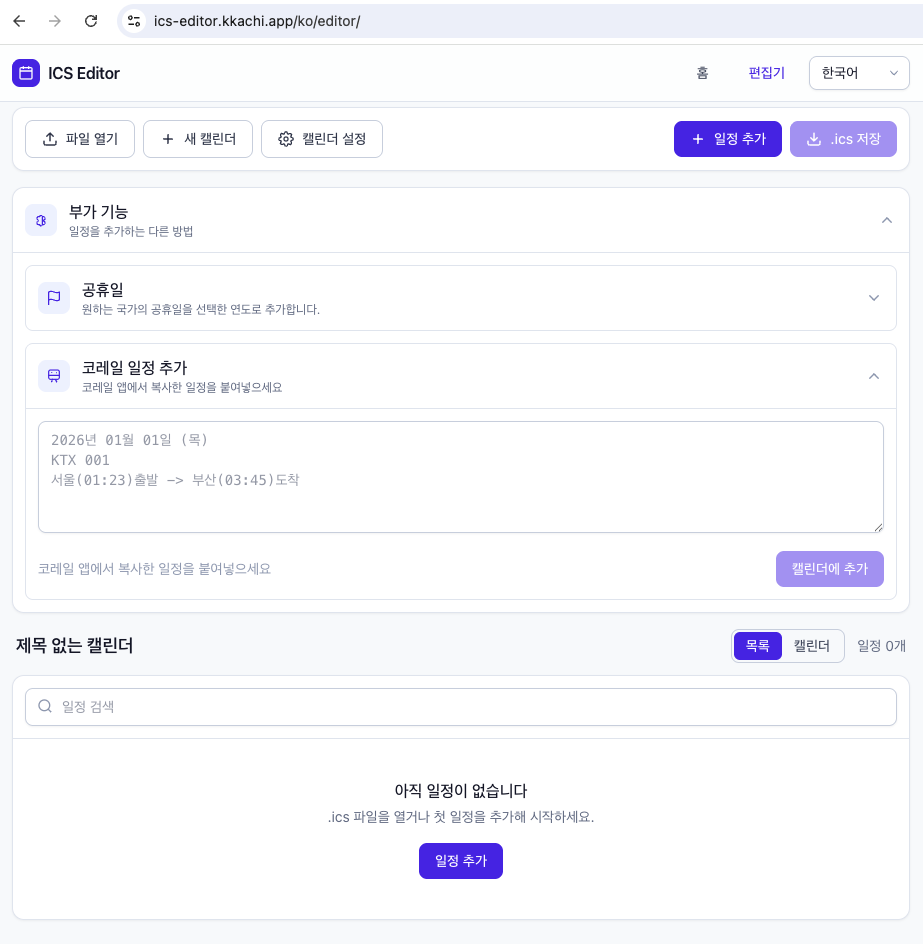
So I made up my mind to develop a program that generates an ics calendar file simply by pasting this text. Just converting Korean KORAIL train schedules into ics files seemed too limited in functionality, so I decided to make it a full-fledged ics file editor, and added features like inputting KORAIL schedules and inputting holidays from countries around the world as add-on functions.
Program Introduction: ICS Editor
The ICS Editor program, which lets you freely edit ics files, is available at the link below. It was built as a PWA app.
Link: https://ics-editor.kkachi.app/
As shown below, you can also use the add-on feature for adding KORAIL train schedules. It also supports editing ics files, so please feel free to use it.
If you have any requests such as bug reports or feature improvements, please let me know anytime, and I’ll check and apply them quickly.