If You're Worried About Personal Information Leaking Through Your Photos, Use an EXIF Editor to Delete the Metadata
Can someone figure out where I live from a photo I posted online?
Most people today probably take photos frequently with their smartphones. And they often upload those photos to the internet—on messaging apps, social media, or community sites. But did you know that in certain situations, doing so can be dangerous?
When you take a photo with your smartphone, an image file is naturally created. However, that file doesn’t just contain data about the image itself—it also includes information about the photo known as metadata. When digital cameras became widespread, a metadata storage format called EXIF (Exchangeable Image File Format) became widely used, and smartphone cameras also record photo information using this format.
The items stored as metadata include a variety of information such as the date and time, the camera’s manufacturer and model name, and camera settings (focal length, shutter speed, etc.). But what can become a problem is that the location where the photo was taken (latitude, longitude, altitude, etc.) is also stored. If you take a photo at a crowded tourist attraction and post it online, it may not be a big deal, but if you upload a photo taken somewhere like your home or workplace and the location information recorded in it becomes public, that could be a privacy issue, right? In severe cases, it could even become a problem for your safety.
Of course, most social media services and the like serve images after processing such as image optimization (reducing the size of the original image so that pages load quickly), and in most cases metadata is also erased during this process. Even so, if you upload the original image with the metadata preserved, then even if the metadata is erased before the image is served, the company processing the original image can still find out where you took the photo. Also, since some services occasionally serve images without removing the metadata, if you’re concerned about the location metadata recorded in your photo files, we recommend deleting the metadata before uploading. That’s why I developed a program that can delete, edit, and view image file metadata.
Introducing the EXIF Editor
I created an EXIF editor for those worried about issues like the location information leaks mentioned above. Since it’s built as a PWA, it can run in a browser without a separate installation, and those who want to install it can also do so as a desktop app or mobile app. All processing is done locally, so there’s no need to worry about your files being uploaded to a server or anything like that.
It supports JPG (JPEG), PNG, WEBP, and HEIC files. In particular, I put a lot of effort into adding support for HEIC files, the file format used by default on newer iPhones. Most other services don’t support editing metadata for HEIC files, but our editor allows metadata editing for HEIC files as well. Since it supports viewing, editing, and deleting image file metadata, I’d appreciate it if you gave it a try. Some file formats may not be supported. If there’s a file format you’d like to see added, let me know and I’ll add it quickly.
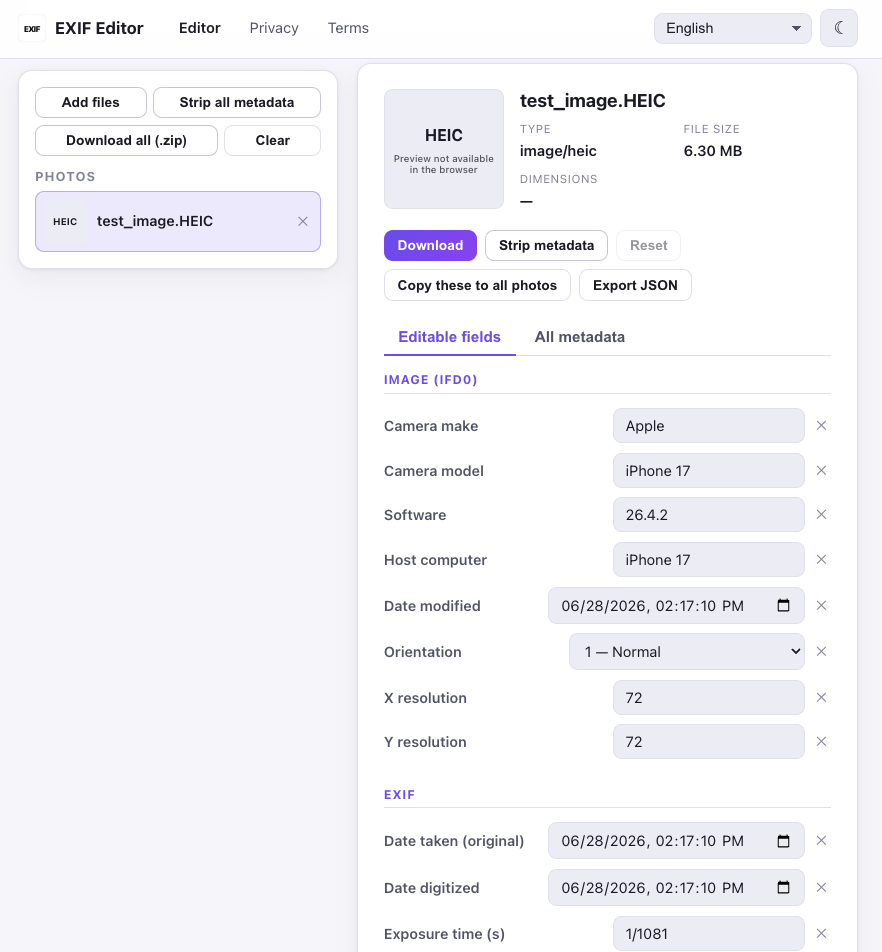
Below is a screenshot of the EXIF Editor. You can see that the metadata of a HEIC file is being displayed. It’s not shown in the screenshot, but if you scroll down, the location information for that image file is also displayed. Using the EXIF Editor, you can also easily edit and delete this kind of metadata information. You can try it out through the link below.